One desk, every record
Admissions, marks and paperwork stop living in separate spreadsheets. One record, carried from enrolment to certificate.
About
It is the register, the mark sheet and the certificate counter — one record a centre can still answer for ten years later.
SDMS was written for a working examination desk, then hardened until it could be handed to any centre that runs one.
Trusted by thousands
Records under management
Documents issued last cycle
Centres running a cycle
Total installations
2,480Growth since last year
We provide best Features
Examination work does not happen in isolation. SDMS unifies enrolment, marking and every document a centre hands out into one record, built to last.
See a full cycle end to end
From the morning a form is filled to the afternoon a certificate is printed — the same record, carried through, never typed twice.
How SDMS works?
Enrol and verify
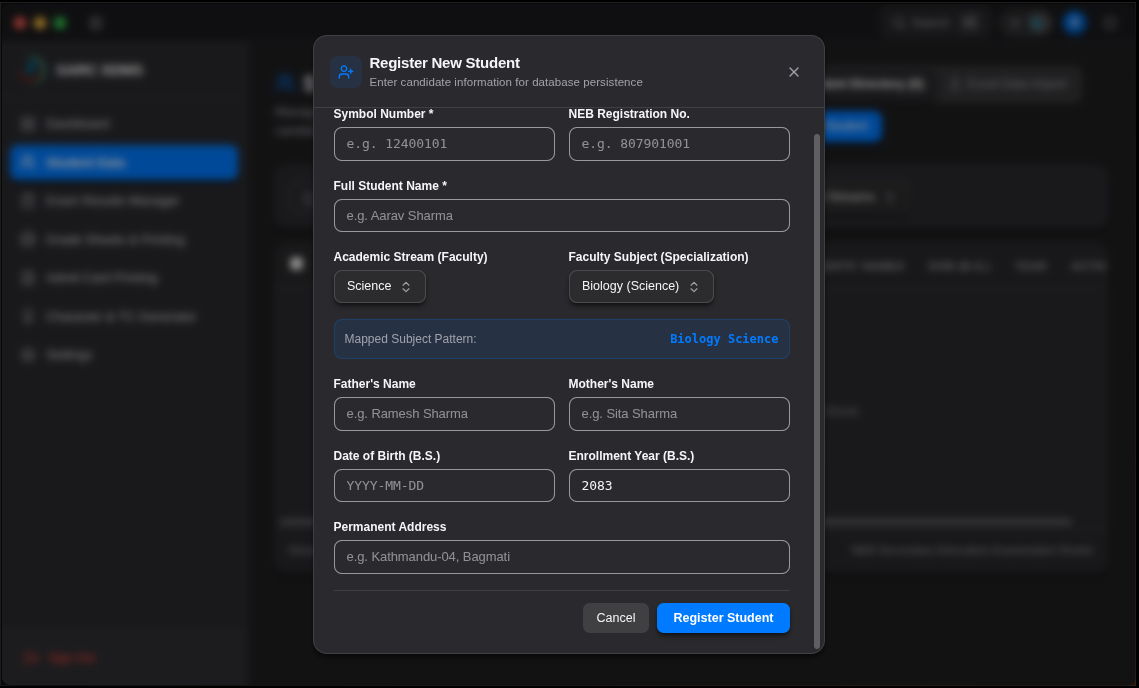
A form is filled once. Photographs, identity numbers and guardian details are checked while they are entered, so a record is complete before it is ever saved.
Record and compute
Enter marks subject by subject. Totals, grades and pass rules follow the scheme you configured — not a formula somebody copied into the wrong column.
Issue and archive
Grade sheets, admit cards and certificates print from that same record, numbered and logged, and can be reissued years later without a reconstruction.
Centres see instant result

Result day used to take three staff and a full weekend. The first cycle on SDMS was finished by Saturday lunch, and not one grade sheet had to be corrected afterwards.
Meera Joshi
Principal, Saraswati Vidya Mandir
Flexible pricing for any scale
Includes:
- Unlimited student records
- Grade sheets, admit cards, certificates
- Offline-first — data stays on your machine
- Multi-operator accounts with audit trail
- Scheduled backup and one-click restore
Includes:
- Unlimited student records
- Grade sheets, admit cards, certificates
- Offline-first — data stays on your machine
- Multi-operator accounts with audit trail
- Scheduled backup and one-click restore
Billed to the institution, not per student. Cancel between cycles.
SubscribeFeatured resources & updates
FAQs
No. It installs on Windows or Linux and runs entirely on that machine, including results and printing. A connection is only used if you switch on cloud backup.
In a database file on the machine you installed it on, inside your own premises. Nothing is uploaded unless you explicitly enable backup, and you choose where those backups are written.
Yes — from spreadsheets or CSV, one academic year at a time, with a preview of what will be created before anything is written. Start with the most recent year; the guide walks through the mapping.
One on the free tier, five on Institution, and unlimited across centres on Federation +. Every operator has their own account, and actions are recorded against the person who took them.
Yes. Grade sheets, admit cards and certificates print from the stored record, so a duplicate carries the original serial and is logged as a re-issue against the student.
It stays on your machine and stays readable — the application drops back to the free tier's limits rather than locking the register. Backups you have taken remain yours.
We keep the record that outlasts the cycle
Install it on one machine, import last year's register, and run a mock result before you commit to anything.
Get Started
Contact Us
A question about a cycle in progress, or ready to install? Either way, write to the desk and a person answers.
- +91 712 000 0000
- support@sdms.app
- Nagpur, Maharashtra 440010